
Introduction
Imagine trying to link data across multiple systems for a machine learning project without a consistent joining key. In our case, the NAICS codes we needed were in Dynamics 365, but with no clean way to connect them to other records. So we had to rely on two potential joining fields: address and business name.
Our approach began with address-based matching, using it as our primary key wherever possible. However, the addresses were formatted inconsistently, with variations like “Street” vs. “St” or “Boulevard” vs. “Blvd.” To solve this, we generated common address variants and applied fuzzy matching to increase our chances of connecting records, even if they weren’t exact matches.
But here’s the catch—addresses weren’t always available. In these cases, we fell back on matching by business name. Unfortunately, the names were rarely straightforward. They often came with extra baggage—internal case numbers, revision tags, even partial addresses—creating a puzzle of inconsistent formats. To clean these up, we used Named Entity Recognition (NER) to extract just the core business name, filtering out unnecessary details to improve our matching accuracy.
By combining fuzzy matching, NER, and FetchXML for structured CRM queries, we created a flexible, multi-layered pipeline. This approach allowed us to navigate the challenges of inconsistent data, providing robust matching capabilities even when traditional joining keys were missing. In this post, we’ll walk through each part of the code, showing how these techniques came together to create an advanced, fallback-driven matching solution.
The Problem: Unclean Joining Keys Across Systems
Inconsistent data across systems is a frequent challenge in data integration. Here, our goal was to match NAICS codes across systems where the data was less than perfect. In Dynamics 365, the NAICS code is available, but the only possible joining key is the business name—rarely a clean solution. In many cases, business names were cluttered with other elements, such as:
-
Internal Case Numbers: These might be appended to business names, adding unnecessary details.
-
Address Variations: While the address sometimes helped, it was often incomplete or formatted differently across systems.
-
Keywords like “Revision” or “Version”: Indicating different record versions, but adding further noise to the business name.
The lack of a standard key required a more sophisticated approach for matching. With different name and address formats, we turned to fuzzy matching for close matches and used NER to identify core names when addresses weren’t available.
Solution Approach: Fuzzy Matching and Named Entity Recognition (NER)
To overcome these challenges, we implemented a hybrid approach:
-
Fuzzy Matching: Fuzzy matching allowed us to search for approximate matches when exact address matches were unavailable, catching minor discrepancies such as typos, abbreviations, or inconsistent spacing.
-
Named Entity Recognition (NER): In cases where the address data was missing, NER helped us extract the business name from text-heavy records, isolating the core entity. This allowed for a cleaner lookup in Dynamics 365, bypassing unnecessary elements.
Together, these techniques made it possible to identify records despite the inconsistency, even when dealing with additional elements. We used Python’s fuzzywuzzy library for fuzzy matching and spaCy for NER, which made implementing these advanced text-processing techniques simple.
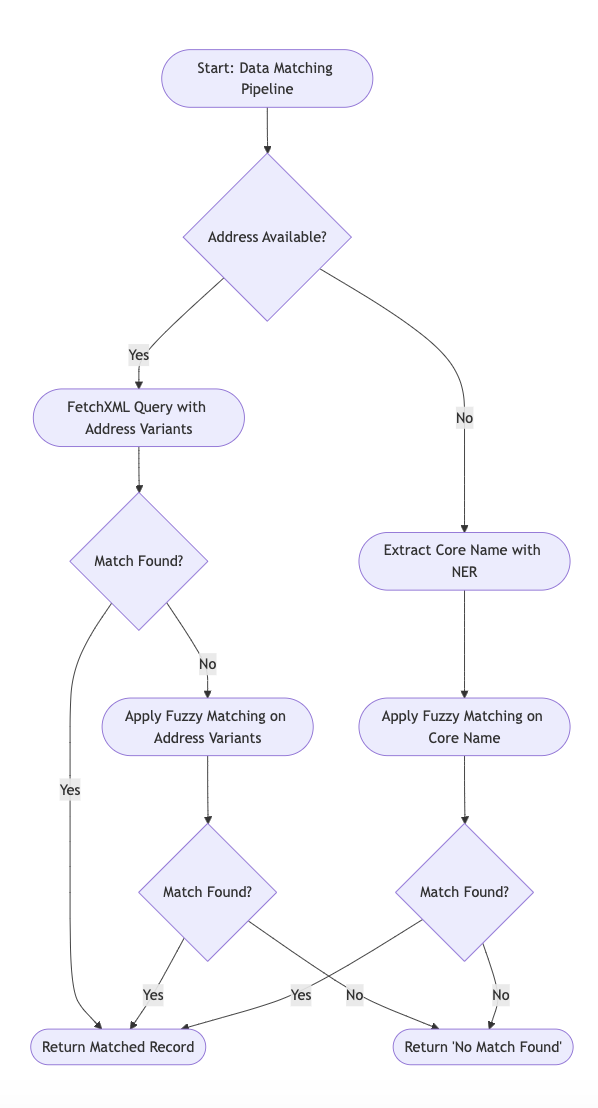
Data pipeline
Code Walkthrough: Enhanced Address Matching in Python
Our solution was designed to handle various matching scenarios with a branching pipeline, relying on fuzzy matching, NER, and FetchXML queries. Let’s break down each step in the process, illustrating how these methods come together to build a flexible, fallback-driven approach.
Step 1: Token Retrieval for CRM Access
Since Dynamics 365 requires secure access, we first retrieve an access token. This enables us to send requests to the CRM API, ensuring each session is authenticated.
# Token retrieval for Dynamics 365 access
token_url = ‘https://login.microsoftonline.com/{tenant\_id}/oauth2/v2.0/token’
token_data = {
‘grant_type’: ‘client_credentials’,
‘client_id’: ‘{your_client_id}’,
‘client_secret’: ‘{your_client_secret}’,
‘scope’: ‘https://simonroofing.crm.dynamics.com/.default’
}
token_response = requests.post(token_url, data=token_data)
if token_response.status_code != 200:
raise Exception(“Failed to obtain access token”, token_response.text)
access_token = token_response.json().get(‘access_token’)
Step 2: Generating Address Variants for Matching
To account for common address variations (like “Street” vs. “St” or “Avenue” vs. “Ave”), we generate a list of address variants. These variants are incorporated into the FetchXML query to catch potential matches.
# Address variants to account for common abbreviations
address_line_variants = [
address_line, # Original address line
address_line.replace(“Drive”, “Dr”),
address_line.replace(“Street”, “St”),
address_line.replace(“Avenue”, “Ave”),
address_line.replace(“Road”, “Rd”),
address_line.replace(“Boulevard”, “Blvd”)
]
Step 3: Building and Executing the FetchXML Query
Once we have the address variants, we use FetchXML to query Dynamics 365 with these variations. This step increases the chances of matching across different address formats in the CRM system.
# Building the FetchXML query with address variants
fetchxml_query = f”“”
“””
for variant in address_line_variants:
fetchxml_query += f’
fetchxml_query += “””
“””
# Encoding the query and calling the CRM API
encoded_query = quote(fetchxml_query)
api_url = f’https://simonroofing.crm.dynamics.com/api/data/v9.1/accounts?fetchXml={encoded\_query}’
headers = {
‘Authorization’: f’Bearer {access_token}’,
‘Accept’: ‘application/json;odata.metadata=minimal’
}
response = requests.get(api_url, headers=headers)
if response.status_code != 200:
raise Exception(“Failed to fetch data”, response.text)
# Parsing the response into a DataFrame
data = response.json().get(‘value’, [])
df = pd.DataFrame(data)
Step 4: Fuzzy Matching Logic for Business Name
If we still have multiple candidates or want to improve matching precision, we apply fuzzy matching to the business names. Here, we use fuzzywuzzy to calculate a similarity score between the target name and CRM records, setting a threshold for acceptable matches.
from fuzzywuzzy import fuzz, process
def fuzzy_match_name(clean_name, crm_data, threshold=70):
match = process.extractOne(clean_name, crm_data[‘Name’], scorer=fuzz.partial_ratio)
if match and match[1] >= threshold:
return crm_data[crm_data[‘Name’] == match[0]].iloc[0][‘NAICS_Name’]
return ‘Missing’
In this function:
-
We use fuzz.partial_ratio for partial matches, ideal for business names that include extra elements.
-
If a match’s similarity score exceeds the threshold, we consider it valid and return the associated NAICS code.
Example: Let’s say we’re looking up “Acme Corp, Case #432.” Our fuzzy matching function will still find “Acme Corp” in the CRM data, ignoring additional details as long as the score is above the threshold.
Step 5: Named Entity Recognition (NER) as a Fallback
If the address is missing and fuzzy matching doesn’t yield a high-confidence match, we use NER to extract the core business name. By identifying entities labeled as “ORG” or “PERSON,” we can remove non-essential elements (like revision numbers or internal codes) to get a cleaner business name.
import spacy
nlp = spacy.load(“en_core_web_sm”)
def process_estimate_name(name):
doc = nlp(name)
core_name = “ “.join([ent.text for ent in doc.ents if ent.label_ in [“ORG”, “PERSON”]])
return core_name if core_name else name # Fall back to the original if no entities found
Example: For “XTFR34 - Beta Solutions Inc, Rev 2,” NER extracts “Beta Solutions Inc” by identifying “Beta Solutions” as an organization. This helps us narrow down the search to the core name, leaving out tags like “Rev 2,” which are irrelevant for matching purposes.
Practical Challenges and Solutions
Even with a robust approach, several practical challenges surfaced:
-
Handling Incomplete Data: Missing addresses sometimes resulted in no matches. Using NER for business name extraction, however, allowed us to retrieve relevant keywords, enabling more effective lookups.
-
Balancing Precision and Recall: Setting the correct threshold for fuzzy matching required fine-tuning. A lower threshold might yield too many false positives, while a higher threshold could miss legitimate matches. Through testing, we found a threshold around 70% worked well, striking a balance between accuracy and flexibility.
-
Variability in Business Names: The inconsistent naming patterns initially caused some issues, especially when names included internal codes. Preprocessing the names to remove such elements significantly improved our results, especially in edge cases.
Best Practices for Building Clean Datasets with Inconsistent Keys
For any project dealing with inconsistent or unstructured data, the following best practices can help:
-
Standardizing Data at Entry: If possible, creating a data entry standard across systems helps reduce the need for post-processing. This includes consistent address formatting and clear separation of fields like business name and case numbers.
-
Fine-Tuning Fuzzy Matching Thresholds: Setting and adjusting match thresholds based on test data can improve matching performance. Monitoring and refining these settings periodically helps maintain accuracy over time.
-
Using NER for Specific Entities: For datasets where addresses or names have added elements, NER can help isolate relevant fields like business names, removing the noise from other tags. This boosts accuracy by focusing on core entities.
Unlock the wealth of information in your data!
Backed by years of expertise in NLP, LLMs, and advanced data processing, we excel in converting diverse, unstructured data into streamlined, structured formats—ready for insightful analysis and decision-making. Connect with us to transform your data today.
[
Get started today!
](https://www.phenx.io/contact)
Article tools